 Zinn® Hosting
Look right in search results
Set your titles and descriptions once with templates, see exactly how each page will appear in Google, and change any page on its own.
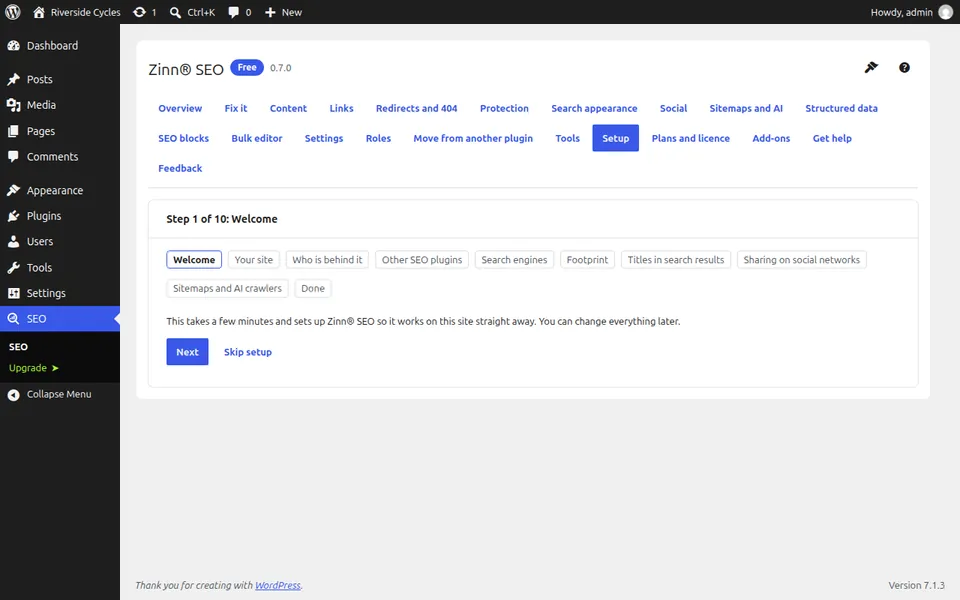
Zinn® SEO gets your WordPress site professionally optimised for search engines and AI assistants: titles, sitemaps, rich results, redirects and AI visibility, with nothing added to the pages your visitors load.
Zinn® SEO is our SEO plugin for WordPress. A guided setup covers titles and descriptions, sitemaps, structured data for rich results, redirects and AI visibility, and moves your settings over from Yoast, Rank Math and other SEO plugins.
Free
Pro starts at $49 a year and costs the same every year. The free plugin stays free.
No add-ons to bolt together and no second plugin for redirects or AI. It is all here, in your language, on phone and desktop.
Set your titles and descriptions once with templates, see exactly how each page will appear in Google, and change any page on its own.
Sitemaps that never slow your site, new pages sent to Bing and other search engines the moment you publish, and redirects that stop visitors hitting dead pages.
Give ChatGPT, Claude and Perplexity a clear map of your site, decide which AI crawlers may read it, and add short answers they can quote.
Help Google show breadcrumbs, product details and more under your result, with structured data that is checked for mistakes before Google sees it.
Live advice while you write, in any language, plus links to your own related pages suggested for you and added in one click.
One list for the whole site, most important first, with a time estimate for each job and one-click fixes for the simple ones.
Zinn® SEO adds only what search engines read. No scripts, no stylesheets, and it never writes its own name into your pages. Here is what it adds to a visitor's page, checked on October 9, 2026.
See how Zinn® SEO compares with Yoast SEO, Rank Math, All in One SEO, SEOPress, The SEO Framework, Slim SEO, Squirrly SEO and SmartCrawl. Every fact about them links to the page it came from, with the date we checked it.
Bring your titles, descriptions and settings over from your current SEO plugin, check every page and switch over safely.
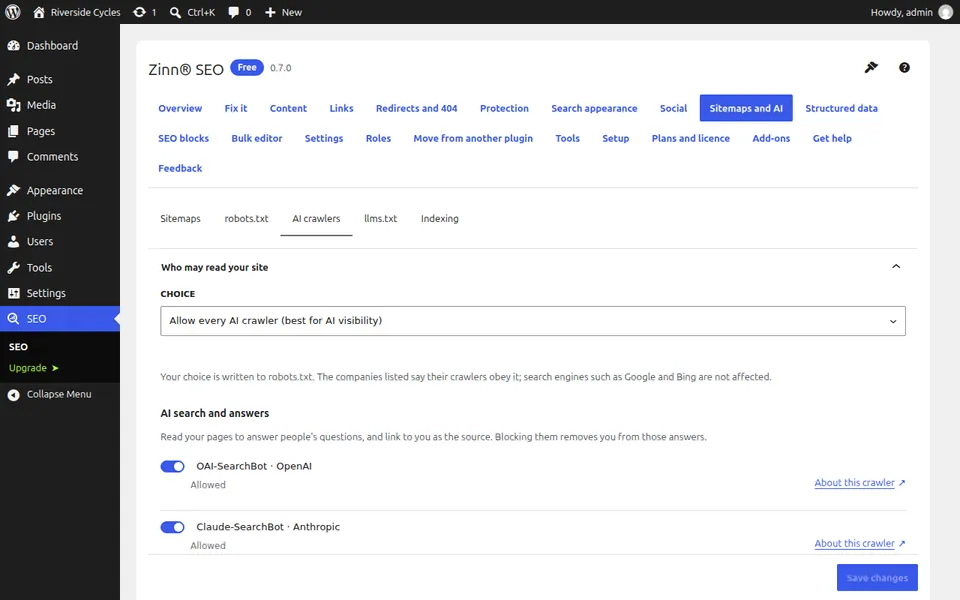
Want to be quoted in AI answers but not used to train AI models? One click does it. Every AI crawler is explained in plain words, so you know what you are allowing.
Write where your team already writes. The Zinn® SEO add-on for Google Docs™ checks your SEO and readability as you type, then sends the document to WordPress as a draft. Nothing goes live until you publish it.
Available as a Google Docs™ add-on with Zinn® SEO Pro.
Most sites never need to pay. The free plugin does the job. Pro is there when you want more, from $49 a year.
| Free | Pro | |
|---|---|---|
| Title and description templates | Yes | Yes |
| XML sitemaps with images | Yes | Yes |
| Video, news and multisite sitemaps | No | Yes |
| llms.txt and the AI crawler policy | Yes | Yes |
| Markdown version of every page for AI agents | No | Yes |
| Structured data graph and the offline check | Yes | Yes |
| Recipe, event, job, course and custom schema types | No | Yes |
| The twelve standard SEO blocks | Yes | Yes |
| Comparison table, fact check, glossary and custom blocks | No | Yes |
| Focus phrases per page | Three | Unlimited |
| Link suggestions while you write | Yes | Yes |
| Automatic links and the broken link checker | No | Yes |
| Redirect manager and 404 monitor | Yes | Yes |
| Redirects before plugins load, and server rule export | No | Yes |
| SEO lock for chosen pages | No | Yes |
| Bulk editor with undo | Yes | Yes |
| CSV export and import of every SEO field | No | Yes |
| SEO revisions with one-click restore | No | Yes |
| Branded social cards drawn on your server | No | Yes |
| Google Docs™ add-on: write there, send to WordPress as a draft | No | Yes |
| SEO Manager and SEO Editor roles | Yes | Yes |
| Any SEO permission for any role | No | Yes |
No. That is the whole point. It adds 0 scripts, 0 stylesheets and no plugin comment to your visitors' pages, so your site is as fast with it as without it.
Yes. While your other SEO plugin is switched on, Zinn® SEO stays out of its way so nothing is doubled up. Once you are happy, keep just one.
Yes. Your sitemap is prepared in the background and loads instantly. On a test site with a million posts it was ready in 142 seconds using 115.9 MB of memory.
It depends which ones. Block the crawlers that answer questions and you vanish from AI answers that would have linked to you. Block the ones that only train AI models and you lose nothing. Zinn® SEO sets that up in one click.
No. The writing checks in the free plugin all run on your own site. Two optional Pro features reach outside, and only when you use them: one reads competitor pages you name, the other uses the AI service you connect with your own key.
Yes, if you run WordPress 6.4 or newer on PHP 7.4 to 8.5.
Most sites do not. Pro adds unlimited focus phrases, a history of every SEO change, more rich result types, automatic links, a broken link checker, video and news sitemaps and spreadsheet editing, from $49 a year.
Delete the plugin and everything it added is removed. If you would rather keep your SEO details, tick Keep my SEO data if the plugin is deleted under Settings, Data first.
Yes, for free. Export your settings to one file and import it on another site: titles, structured data, sitemaps, robots rules, sharing, breadcrumbs and which features are on all come over, and the site's own address is put in for you. You see every change before anything is applied, and a file with one value that is not allowed is refused whole. Keys and connections never leave the site.
It does the same job inside WordPress, for a fraction of the price: as you write, it scores how well your post covers the words, names, questions and headings of the 10 pages that rank for your phrase, and lists what to add and what you overuse. There is no monthly plan: the plugin is free, and reading the top 10 for a phrase costs $0.05 once, from your Zinn® account balance, then is kept for every post that targets it. It works in 58 languages, in the block editor, the classic editor, Elementor and other page builders.
Yes, for free. In Structured data, Fill with AI, the AI writes an FAQ, how-to steps, product details or an article summary from each page's own text, for every page that has none, a few pages per request. You see the cost first (measured on our own account: about $0.06–$0.16 per 100 pages for FAQs), review every one with its check against schema.org and Google's rules, and undo a whole batch in one click. The FAQ shows on the page under its text, as Google requires. Google stopped showing FAQ rich results in May 2026, but Bing and AI assistants still read FAQ structured data. Pages with an FAQ of their own are left alone and cost nothing.
Yes, with Pro. Site care checks every file against the official copies and your accounts, settings and pages for malware and spam, reads your error logs and explains each error with the fix, and cleans up the database safely. Every change is backed up first, nothing is deleted and everything can be undone in one click. The AI only sees your code with your secrets removed, and a code fix is switched on only after you approve it and it passes a test.
Yes, with Pro: Fix it on autopilot fixes the whole Fix it list in one run, across the whole site or one section. It writes the missing meta descriptions, gives pages that share a title their own, writes alt text, fills in structured data, plans the internal links and runs the one-click fixes. You see what it will change and what it costs first, approve it all or one by one, every change keeps the value it replaced, and a whole run undoes in one click. It can run weekly and e-mail you a summary. Yoast SEO Premium, Rank Math and All in One SEO offer bulk AI titles and descriptions (Rank Math also bulk alt text) from their own post lists; their pages describe no run over the whole issue list and no one-click undo of a run.
Yes, with Pro: Fix every internal link reads every page and fixes, in one run you review first, the links that hop through a redirect or a chain, land on a missing, trashed, unpublished or hidden page, or point at the wrong language. Redirected links go straight to the live page, wrong-language links to the translation, and for a page that is gone the AI proposes the closest page by meaning. Each page changed keeps a revision and the whole run undoes in one click. By their own pages (read 2026-10-16), Link Whisper Premium's error report finds broken links and its link changer swaps one address for another across the site, and All in One SEO pairs its Link Assistant with a separate Broken Link Checker; neither describes fixing links that only go through a redirect or point at the wrong language.
Yes, in Pro. Links, Outbound links lists every site your pages link to with the links, pages, words and link type, checks whether each site is still live, and flags spam or expired domains. Change or remove one link where it is, or every link to a site at once: you review it first, each page keeps a revision, and a whole change undoes in one click.
Yes, with Zinn® SEO Pro. Safe updates tries each plugin, theme and WordPress update on a copy of your site that visitors never see, reads your key pages, forms, checkout and signed-in screens with both versions, and installs it only when nothing breaks. The version before is kept, and if your site breaks after an update it is put back by itself. The AI explains any problem in plain words and can write a small fix for you to approve.
Mainstream plans are on Zinn Digital® with a 14-day free trial and a 30-day money-back guarantee. PBN plans are on pbn.ltd.